How to Choose the Best Mini CNC Machine?

Choosing the best mini cnc machine requires more than comparing price tags and spindle speed. A compact machine may fit beside a workbench, yet still demand careful attention to rigidity, accuracy, software, and safety. In practical workshop testing, small differences become visible quickly. A loose gantry can leave stepped edges on aluminum. Weak dust control can cover the rails within minutes.

Industry data shows why this decision matters. Fortune Business Insights reports continued growth in the global CNC machine market, driven by automation, customized production, and demand for precise components. Deloitte’s 2024 Smart Manufacturing and Operations Survey also found that manufacturers increasingly view smart manufacturing as a competitive priority. These findings support a clear point: even smaller machines must deliver dependable, repeatable results. However, market reports often combine industrial, desktop, and hobby equipment. Their figures should not be treated as direct evidence for every mini cnc machine.

This guide focuses on the details buyers can verify themselves. We will examine working area, frame construction, spindle power, drive systems, controller compatibility, and after-sales support. Material choice matters too. Wood, acrylic, aluminum, and brass place very different demands on a machine. Start with your real projects, not impressive specifications. That approach is less exciting, but usually more accurate. A machine that cuts plywood beautifully may struggle with aluminum. An inexpensive model may also become costly after upgrades, tooling, and replacement parts. The best choice balances performance, learning curve, maintenance, and long-term reliability. Some recommendations may change as technology improves, so careful judgment remains essential.
How to Choose the Best Mini CNC Machine?

What a Mini CNC Machine Is and What It Can Do

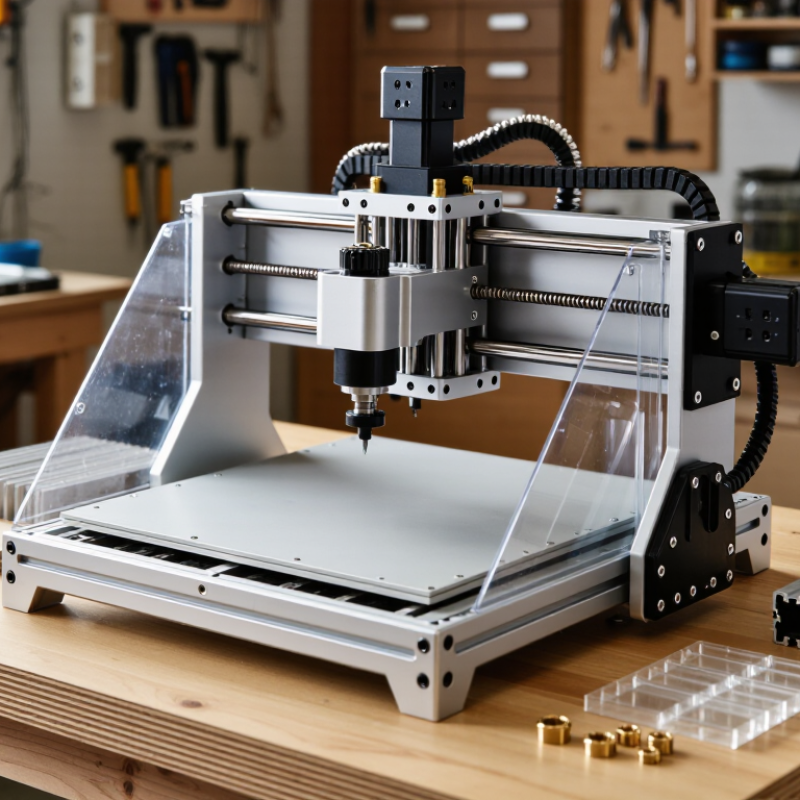
A mini CNC machine is a compact computer-controlled tool for cutting, carving, drilling, and engraving. It follows digital toolpaths created in design software. Unlike a hand tool, it repeats the same movement with consistent guidance. Typical models use a small work area, a rotating spindle, and clamps to hold material securely. Small does not mean simple.

In a workshop, a mini CNC machine can shape wood, acrylic, plastic, and some soft metals with suitable cutters. It can produce signs, panels, small mechanical parts, templates, and prototypes. A sharp bit and correct feed rate matter greatly. Otherwise, edges may burn, melt, or become rough. It cannot replace a heavy industrial machine for thick steel or large workpieces. Measure twice.

Choosing one requires more than checking advertised resolution. Examine the frame rigidity, usable cutting area, spindle power, control software, and emergency stop features. Dust collection and enclosure options also affect daily comfort and safety. I once underestimated table movement on a compact machine, and a small error ruined an otherwise careful cut. That experience changed my selection process.

A reliable choice should include clear manuals, stable replacement parts, and practical technical support. Test samples can reveal more than impressive specifications. Cut a simple square, check its dimensions, and inspect the surface finish. Leave room for learning, because setup, tooling, and material behavior still require judgment.

How to Match Machine Size with Your Materials and Projects

Choosing a mini CNC machine starts with your material, not the machine’s advertised footprint. Measure your largest workpiece, then add room for clamps, tool movement, and safe access. The usable travel is always smaller than the table.

A practical target is 20% extra space on each axis. A 300-millimeter panel may need at least 360 millimeters of working travel. Measure twice. Thick stock also requires enough Z-axis clearance for the cutter, holder, and fixture. Wood and plastics usually tolerate lighter frames and larger cutting areas. Aluminum demands slower feeds, stronger rigidity, and better chip evacuation. My early mistake was choosing a compact machine that fit the material but not the vise. The setup became awkward and inefficient.

Market data supports careful sizing. Grand View Research’s CNC machine market analysis projects an 8.3% compound annual growth rate from 2024 to 2030, reflecting wider use across small workshops and production environments. MarketsandMarkets estimates the market could reach about 101.6 billion dollars by 2028, although research methods produce different totals. That growth does not make every small machine suitable. A larger machine may waste space and increase costs, while an undersized one can force multiple setups and reduce accuracy. Consider your next project, too. A machine for nameplates may struggle with cabinet panels. Leave practical room for growth, but avoid buying capacity you cannot support with stable mounting, dust control, and proper tooling.

How to Choose the Best Mini CNC Machine? – How to Match Machine Size with Your Materials and Projects

Mini CNC Machine Class Typical Machine Footprint Typical Working Area (X × Y × Z) Recommended Materials Suitable Project Types Typical Spindle Power Practical Cutting Depth per Pass Typical Positioning Accuracy Main Advantages Important Limitations
Compact Desktop Engraver Approximately 400–600 × 300–450 mm Approximately 180–300 × 100–180 × 30–50 mm Wood, plywood, MDF, acrylic, plastics, PCB laminates, wax and other soft materials Names, signs, badges, small ornaments, PCB isolation milling, thin panels and educational projects 80–300 W, commonly using a high-speed DC spindle About 0.5–3 mm in wood or plastic; shallower cuts are normally used in metals Approximately ±0.05–0.15 mm, depending on frame, leadscrews and calibration Low space requirement, relatively low cost, simple setup and suitable for beginners Small work envelope, limited rigidity and poor suitability for repeated deep cuts or hard metals
Small Gantry CNC Router Approximately 600–900 × 500–700 mm Approximately 300–500 × 200–350 × 50–80 mm Solid wood, plywood, MDF, acrylic, plastics, composites and light aluminum work Small furniture components, instrument panels, 3D reliefs, signage, prototypes and joinery parts 300–800 W, commonly with an air-cooled or water-cooled spindle About 1–5 mm in wood; approximately 0.2–1 mm per pass in aluminum with suitable tooling and feeds Approximately ±0.03–0.10 mm under typical operating conditions Good balance between footprint, cutting capacity and project versatility Requires a sturdy table, dust control and careful workholding; not intended for heavy steel cutting
Benchtop CNC Mill Approximately 700–1,000 × 600–900 mm Approximately 200–400 × 100–250 × 150–250 mm Aluminum, brass, copper, engineering plastics and limited mild-steel work with conservative settings Mechanical brackets, fixtures, small metal parts, precision prototypes, tooling and repair components 500–1,500 W, usually with a lower-speed, higher-torque spindle than a router About 0.2–2 mm in aluminum; generally less in steel depending on rigidity and cutter diameter Approximately ±0.01–0.05 mm when properly trammed, secured and calibrated Greater rigidity, better metal-cutting control and improved dimensional consistency Smaller XY work area than many routers, higher machine weight and greater setup complexity
Large-Format Mini Router Approximately 900–1,500 × 700–1,200 mm Approximately 600–1,000 × 400–700 × 60–120 mm Sheet goods, solid wood, plastics, foam, acrylic, composites and occasional light aluminum Cabinet parts, large signs, templates, decorative panels, full-size patterns and nested production work 800–2,200 W, typically using a variable-speed router or spindle About 2–8 mm in wood depending on cutter size and machine stiffness; much shallower in aluminum Approximately ±0.05–0.20 mm across the working area Handles larger materials and reduces the need to split sheet-based projects into sections Needs substantial floor or bench space; larger moving components can reduce accuracy if the frame is light
Precision Micro CNC Mill Approximately 500–800 × 500–800 mm Approximately 100–250 × 100–200 × 100–200 mm Aluminum, brass, copper, plastics, graphite and small quantities of mild steel Small precision components, clock parts, miniature mechanisms, electronics housings and laboratory prototypes 200–1,000 W, with a spindle selected for small-diameter tooling and controlled runout About 0.05–1 mm per pass, depending on material, cutter diameter and machine rigidity Approximately ±0.005–0.03 mm in well-maintained and carefully calibrated equipment High control over small features, fine detail and repeatable metal machining Limited work envelope, slower material removal and less suitable for large wooden or sheet projects
4-Axis Mini CNC Machine Approximately 700–1,100 × 600–900 mm Approximately 250–500 × 150–300 × 80–180 mm, plus rotary workpiece capacity Wood, plastics, wax, aluminum and other materials supported by the machine’s spindle and tooling Engraving cylindrical parts, knobs, handles, flutes, small sculptures and indexed machining on multiple faces 500–1,500 W Comparable to a 3-axis machine of similar construction; rotary setups often require lighter cuts Approximately ±0.02–0.10 mm, with rotary-axis accuracy affected by backlash and alignment Machining around a part can reduce manual repositioning and improve access to multiple faces Requires additional software setup, post-processing and careful rotary-axis calibration

Note: Dimensions and performance figures are typical ranges for mini CNC equipment. Actual results depend on frame rigidity, drive system, spindle runout, tool selection, workholding, material condition, cutting parameters and machine calibration.

Which CNC Features Matter for Accuracy, Speed, and Ease of Use

Choosing the best mini CNC machine starts with accuracy, not advertised speed. A rigid frame reduces vibration when cutting aluminum or hardwood. Check spindle runout, ideally measured in hundredths of a millimeter. Lower runout produces cleaner edges and more consistent holes. Ball screws usually control backlash better than basic threaded rods. However, excellent hardware cannot fix poor calibration.

Speed involves more than rapid movement. Look for stable acceleration, reliable stepper control, and a spindle with adjustable speed. A machine that moves quickly but stalls under load wastes time. Test whether its working area suits your parts, because a small bed becomes limiting surprisingly fast. I once chose a compact machine for its impressive travel rate. The usable cutting space was still too small.

Ease of use depends on the controller and maintenance routine. Clear software, automatic homing, repeatable work zeroing, and accessible limit switches reduce setup errors. A rigid dust shield and simple lubrication points also matter in daily work. Read technical drawings, not only customer ratings. Pay attention to repeatability, supported materials, and replacement-part availability. I would also inspect sample cuts, if possible. They reveal chatter, uneven depth, and finish quality better than specifications. No mini CNC is perfect. The practical choice balances rigidity, controlled speed, accuracy, and the operator’s patience.

How to Compare Software, Compatibility, and User Support

Choosing the best mini CNC machine starts with its software, not its advertised cutting size.

Check whether the included control program supports common design and toolpath formats. A practical workflow should move from drawing to simulation, then to machine control without repeated conversions. Look for clear feeds, speeds, work offsets, probing options, and emergency-stop instructions.

Simulation matters. It can reveal collisions before a cutter reaches the workpiece. Some low-cost software looks simple, yet hides essential settings behind confusing menus.

Compatibility deserves a careful check.

Confirm the operating system, file formats, controller connection, and available drivers before ordering. Also check whether the machine accepts metric measurements and standard post-processors. A design file may open correctly but generate unsuitable code for a particular controller.

I once treated “universal compatibility” as a guarantee and spent an evening correcting axis directions. That mistake taught me to test a small, non-cutting file first.

Test small files. Compare independent manuals and user reports, not only sales claims.

User support often separates a usable tool from an expensive project.

Look for searchable documentation, setup videos, troubleshooting tables, and human assistance. Ask how support handles file errors, lost settings, calibration, and replacement parts. Response speed matters, but answer quality matters more. A vague reply can waste material and damage confidence.

Community forums may help, though their advice is not always verified. Save tested settings and record every change.

Details get missed. Even experienced users need reliable notes when software updates change familiar menus.

How to Evaluate Safety, Budget, Maintenance, and Long-Term Value

How to Choose the Best Mini CNC Machine?

Safety should be your first practical test, not an afterthought. Look for a reliable emergency stop, guarded moving parts, stable wiring, and clear operating instructions. During a workshop trial, I check whether the machine stays steady when cutting wood or soft metal. Excessive vibration is a warning sign. Hearing protection and safety glasses should remain part of every session.

Budget means more than the purchase price. Add cutting tools, software, dust control, replacement parts, and training time. A cheaper machine can become expensive when small repairs interrupt projects. I once underestimated tooling costs and delayed a prototype for weeks. That mistake changed how I compare machines. Ask about spare-part availability and service support before buying.

Tips: Measure your workspace, including door clearance and ventilation space. Choose a machine with accessible rails and simple maintenance points. Check whether cleaning chips requires removing half the enclosure. It should not. Keep a maintenance log for lubrication, belt tension, calibration, and unusual noise. These notes can reveal problems early, although I sometimes forget to update mine. For long-term value, prioritize rigid construction, replaceable components, accurate repeatability, and software that remains practical as your skills improve. A machine should support careful learning, not encourage rushed operation.

CAMaster Logo